
Lorem ipsum dolor sit amet consectetur netus erat
Lorem ipsum dolor sit amet consectetur bibendum volutpat.

You've implemented a new learning platform for your team. The analytics dashboard is full of charts, numbers, and insights. But as you stare at all this data, one question keeps nagging at you: What am I supposed to do with all of this?
If you're feeling overwhelmed by learning analytics, you're not alone. The key isn't to look at everything—it's to know which data matters for your specific role and decisions. At Colleva, we've organized our dashboard around four key views that match how different people work.
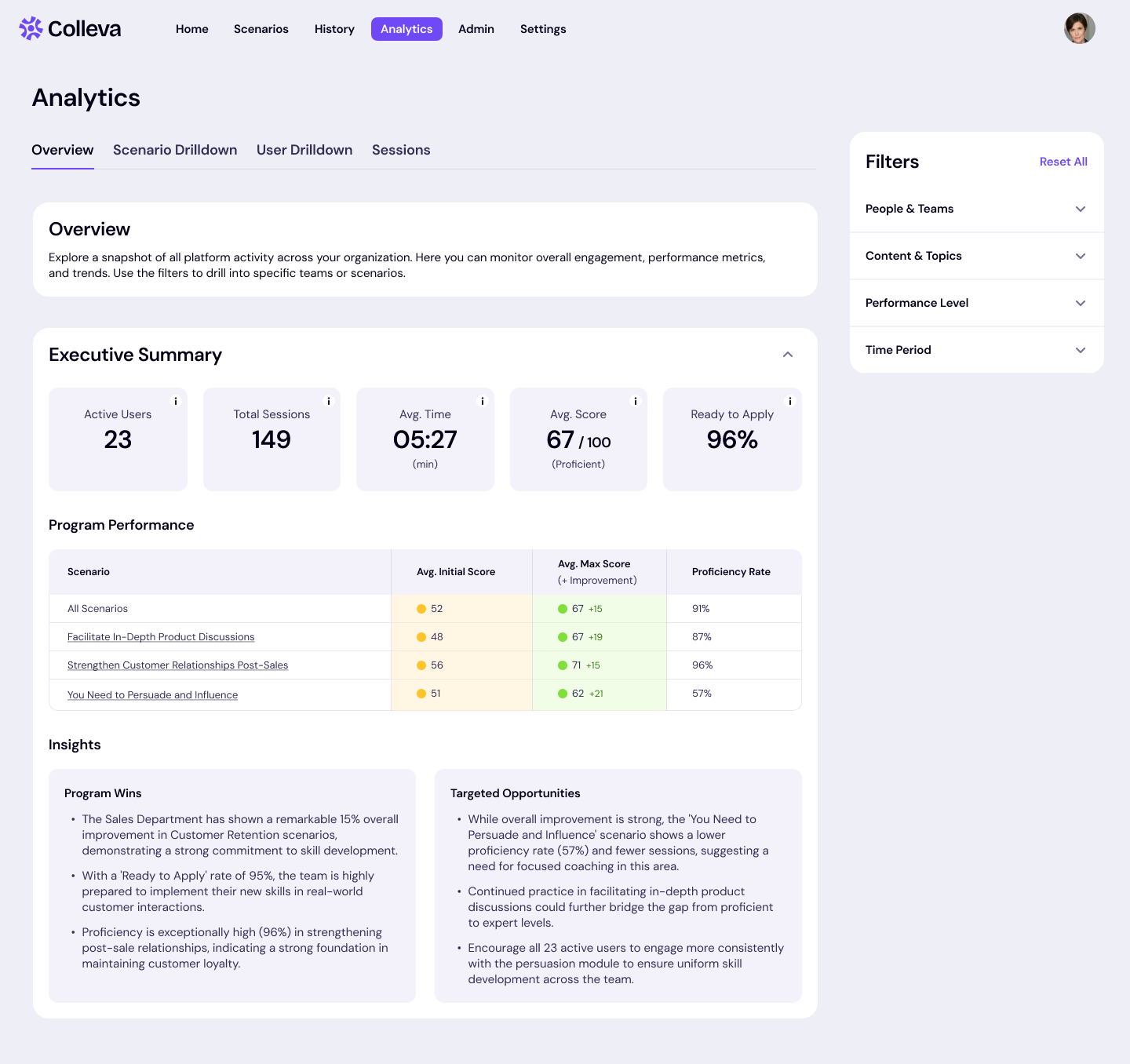
Who uses this: HR directors, L&D leaders, executives, department heads
When to check it: Weekly or monthly strategic reviews
What you'll see:
The aha moment: You can quickly spot which teams or departments are thriving and which might need attention. Instead of waiting for quarterly reports, you can see patterns as they emerge.
Example: Jess, VP of Sales, checks the Overview dashboard monthly. She sees that her team's overall performance on customer retention scenarios has improved 15% over the past quarter. She uses this data in her board presentation to show training ROI and decides to expand the program to other departments.
Pro tip: Use the filters to focus on specific teams, time periods, or scenario types. This turns the overview from a general report into targeted insights for your next leadership meeting.
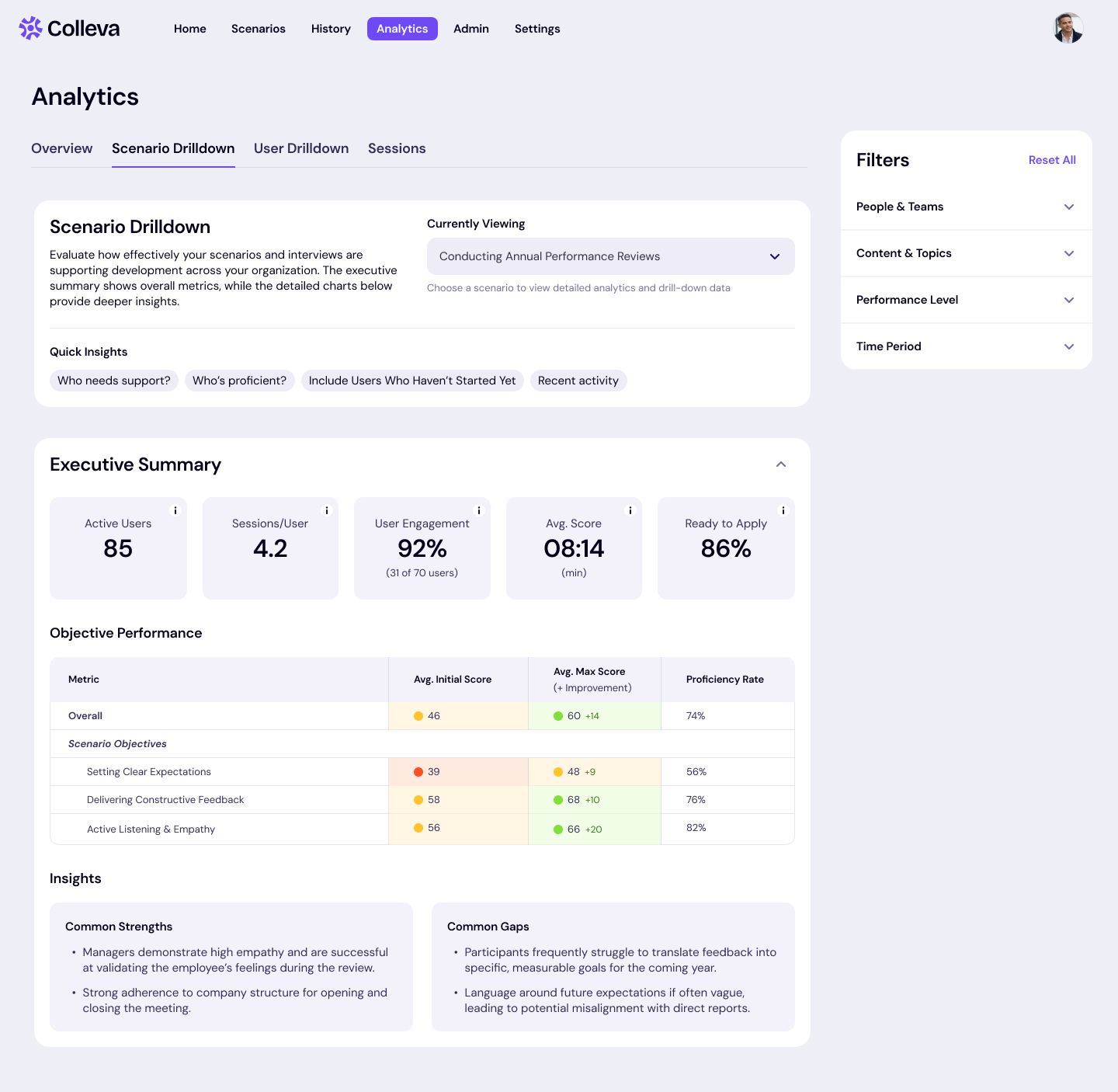
Who uses this: L&D specialists, training coordinators, program managers
When to check it: When designing new training programs or evaluating existing ones
What you'll see:
The aha moment: You discover that the De-Escalate a Situation scenario has great engagement but low scores on specific objectives. The data shows people struggle with de-escalation but excel at empathy. Now you know exactly what to improve.
Example: Carlos, Learning Coordinator, uses Scenario Drilldown weekly. He notices that the Annual Performance Review scenario is getting completed, but people are scoring poorly on the Setting Clear Expectations metric. He realizes that he needs to provide additional resources before the review season starts.
Pro tip: Export the detailed session data when you need to do deeper analysis or create custom reports for stakeholders.
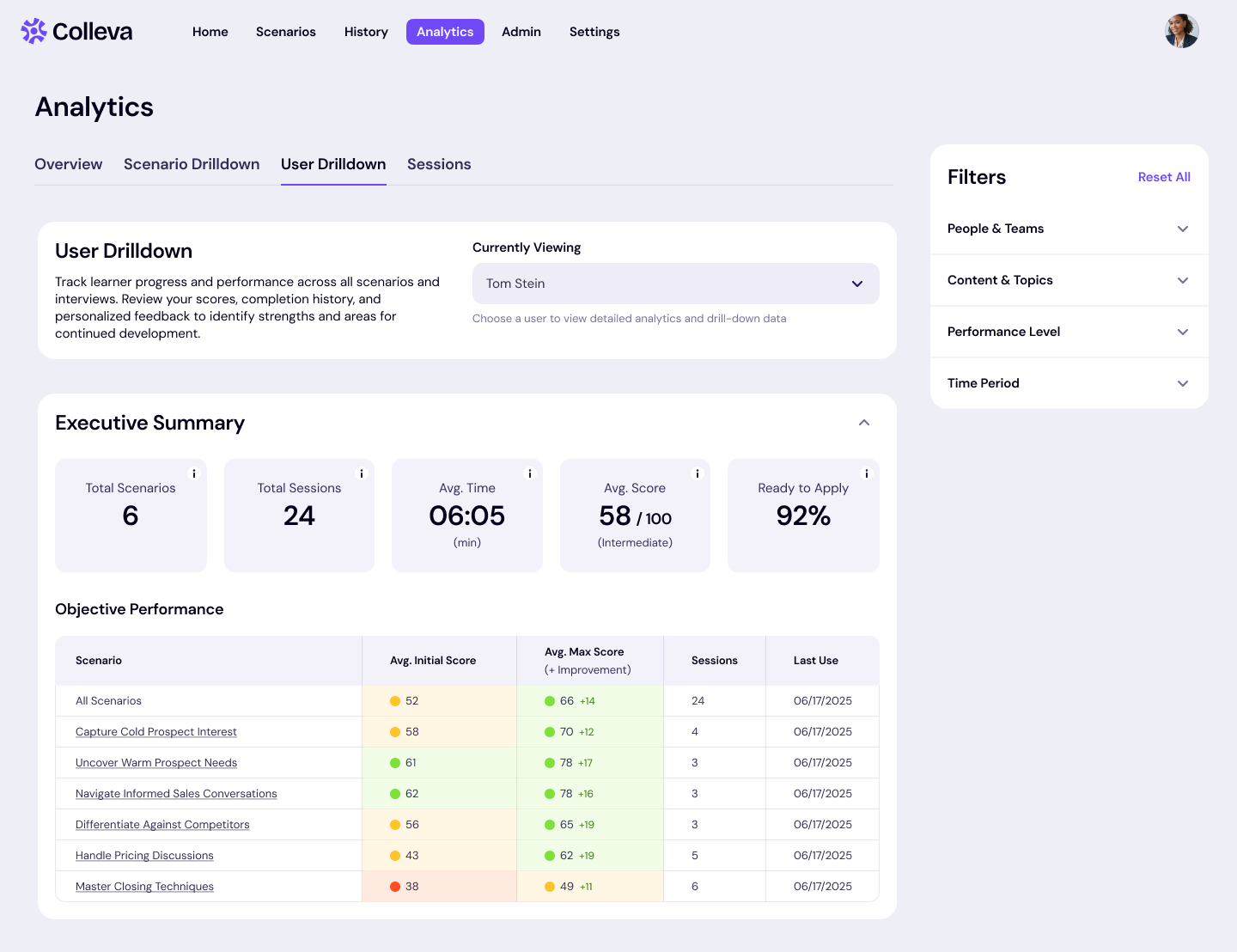
Who uses this: Direct managers, team leads, HR business partners
When to check it: Before coaching conversations, performance reviews, or when planning individual development
What you'll see:
The aha moment: Instead of generic feedback like "you need to work on communication skills," you can say "I noticed you're doing great with active listening in customer scenarios, but when it comes to setting boundaries with unreasonable requests, you tend to give in too quickly. Let's work on some specific techniques."
Example: Jennifer, Regional Sales Manager, checks User Drilldown before her monthly one-on-ones. She sees that Tom is excelling at rapport-building but struggling with closing techniques. She spends their session role-playing different closing approaches and assigns him additional practice scenarios focused on that skill.
Pro tip: Review individual user data right before one-on-one meetings. It transforms vague professional development conversations into specific, actionable coaching sessions.
Who uses this: L&D analysts, managers doing deep-dive coaching, program evaluators
When to check it: When you need to understand exactly what happened in specific interactions
What you'll see:
The aha moment: You can see the exact moments where someone succeeded or struggled, giving you incredibly specific coaching insights.
Example: Alex, HR Data Analyst, exports session data quarterly. He correlates training performance with actual sales results to calculate ROI and identify which scenarios have the strongest connection to business outcomes.
Pro tip: Use this view when someone's performance seems inconsistent. The detailed data often reveals patterns that aren't obvious from summary scores.
Analytics should feel like a useful tool, not an overwhelming burden. When you focus on the view that matches your needs, analytics transform from interesting reports into actionable insights that help your people grow.
Weekly executive check (5 minutes):
Weekly program review (15 minutes):
Before coaching conversations (10 minutes):
Quarterly deep dive (1 hour):
Ready to see how robust learning analytics can transform your L&D strategy? Learn more about Colleva's offerings or schedule a demo to see it in action.
Lorem ipsum dolor sit amet consectetur. Lectus ac eleifend in convallis imperdiet. Amet tortor lorem odio proin dolor. Convallis dolor posuere vitae pellentesque nulla rutrum sit. Quam aliquet a arcu iaculis sit fringilla eu. Tortor tortor amet nunc non odio posuere convallis ut. Massa risus orci enim arcu. Sit platea pharetra purus aliquet proin. Ac gravida id sit odio. Tempor posuere tellus iaculis in enim scelerisque non amet id. Egestas nisl risus placerat quis euismod hendrerit ac. Condimentum at quam nunc adipiscing urna facilisi leo. Turpis senectus posuere laoreet tellus hendrerit faucibus platea blandit sed. Nibh feugiat felis felis sem urna volutpat eget turpis amet. Lorem auctor egestas diam imperdiet.
Felis venenatis mi varius ac nunc mi neque rhoncus. A nullam turpis laoreet odio cras mauris nulla auctor. Vel maecenas facilisis congue ultrices mauris justo fames a platea. Etiam eget nascetur nibh vitae. Eu accumsan mus dolor tristique.
Lorem ipsum dolor sit amet consectetur. Lectus ac eleifend in convallis imperdiet. Amet tortor lorem odio proin dolor. Convallis dolor posuere vitae pellentesque nulla rutrum sit. Quam aliquet a arcu iaculis sit fringilla eu. Tortor tortor amet nunc non odio posuere convallis ut. Massa risus orci enim arcu. Sit platea pharetra purus aliquet proin. Ac gravida id sit odio. Tempor posuere tellus iaculis in enim scelerisque non amet id. Egestas nisl risus placerat quis euismod hendrerit ac. Condimentum at quam nunc adipiscing urna facilisi leo. Turpis senectus posuere laoreet tellus hendrerit faucibus platea blandit sed. Nibh feugiat felis felis sem urna volutpat eget turpis amet. Lorem auctor egestas diam imperdiet.

Lorem ipsum dolor sit amet consectetur. Lectus ac eleifend in convallis imperdiet. Amet tortor lorem odio proin dolor. Convallis dolor posuere vitae pellentesque nulla rutrum sit. Quam aliquet a arcu iaculis sit fringilla eu. Tortor tortor amet nunc non odio posuere convallis ut. Massa risus orci enim arcu. Sit platea pharetra purus aliquet proin. Ac gravida id sit odio. Tempor posuere tellus iaculis in enim scelerisque non amet id. Egestas nisl risus placerat quis euismod hendrerit ac. Condimentum at quam nunc adipiscing urna facilisi leo. Turpis senectus posuere laoreet tellus hendrerit faucibus platea blandit sed. Nibh feugiat felis felis sem urna volutpat eget turpis amet. Lorem auctor egestas diam imperdiet.
Lorem ipsum dolor sit amet consectetur. Lectus ac eleifend in convallis imperdiet. Amet tortor lorem odio proin dolor. Convallis dolor posuere vitae pellentesque nulla rutrum sit. Quam aliquet a arcu iaculis sit fringilla eu. Tortor tortor amet nunc non odio posuere convallis ut. Massa risus orci enim arcu. Sit platea pharetra purus
Lorem ipsum dolor sit amet consectetur. Lectus ac eleifend in convallis imperdiet. Amet tortor lorem odio proin dolor. Convallis dolor posuere vitae pellentesque nulla rutrum sit. Quam aliquet a arcu iaculis sit fringilla eu. Tortor tortor amet nunc non.
Lorem ipsum dolor sit amet consectetur. Lectus ac eleifend in convallis imperdiet. Amet tortor lorem odio proin dolor. Convallis dolor posuere vitae pellentesque.
Lorem ipsum dolor sit amet consectetur. Lectus ac eleifend in convallis imperdiet. Amet tortor lorem odio proin dolor. Convallis dolor posuere vitae pellentesque nulla rutrum sit. Quam aliquet a arcu iaculis sit fringilla eu. Tortor tortor amet nunc non odio posuere convallis ut. Massa risus orci enim arcu. Sit platea pharetra purus aliquet proin. Ac gravida id sit odio. Tempor posuere tellus iaculis in enim scelerisque non amet id. Egestas nisl risus placerat quis euismod hendrerit ac. Condimentum at quam nunc adipiscing urna facilisi leo. Turpis senectus posuere laoreet tellus hendrerit faucibus platea blandit sed. Nibh feugiat felis felis sem urna volutpat eget turpis amet. Lorem auctor egestas diam imperdiet.

Lorem ipsum dolor sit amet consectetur bibendum volutpat.
Lorem ipsum dolor sit amet consectetur bibendum volutpat.
Lorem ipsum dolor sit amet consectetur bibendum volutpat.

AI adoption plateaus when the humans working alongside it lack the skills to do their part. The tool is only as valuable as the human wielding it.

Deloitte's 2026 research shows human-centric AI approaches outperform. Here's what that means for L&D investment.

Research shows AI brain fry is real, and HR is among the hardest-hit functions.